The technical SEO audit checklist that ends in fixes, not findings
A crawl of one 318-page site turned up 1,180 findings. Thirty-five were critical, and thirty-two of those traced back to four missing URLs. How to run a technical audit that comes out the other end as a work order instead of a spreadsheet.
What should a technical SEO audit checklist actually produce?
A work order. A list of things a developer or an editor can pick up on Monday and finish. Most audits produce a count, a score out of 100 or a red-amber-green table, and none of those is a task.
Almost every audit stops short of that. The crawler finds the problem, names it, counts the pages, and hands the interpretation back to you. That last step is where audits die, because interpretation is the expensive part and it gets deferred until nobody remembers why the crawl was run.
Here's what the gap looks like on a real site. A crawl of unscriptedseo.com covered 318 pages and produced 1,180 issues. Read as a number, that site's a disaster. Read by severity, it isn't: 35 critical, 642 warning, 503 informational. All 35 critical rows are the same issue type, broken internal links. Thirty-two of them come from eleven hub pages pointing at the same four URLs that no longer exist.
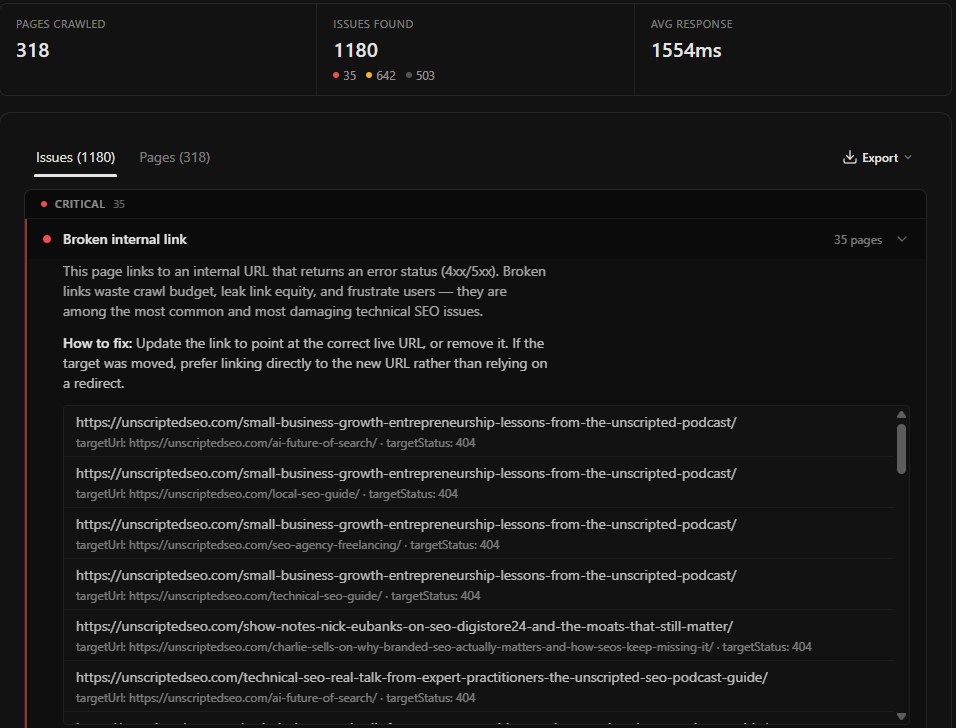
Restoring or redirecting four URLs clears most of the critical tier. The other 1,145 rows are real, and none of them are why that site's not ranking.
Sort by severity before you read a single URL
The audit engine tags every issue with one of three severities, and the split is deliberate rather than cosmetic. Of the 27 issue types Role SEO checks, only four are critical. A crawler that got blocked, a 5xx server error, a broken internal link, and a missing title tag. Fourteen are warnings and nine are informational.
That ratio tells you how to read any audit. If a report has 1,000 rows and no critical ones, the site has housekeeping to do and no emergency. If it has 12 critical rows, start there and ignore everything else until they're gone.
The severity tiers map to three different kinds of work:
- Critical issues stop a page from being seen or understood. They go to whoever can deploy.
- Warnings describe pages competing with each other or leaking equity. Duplicate titles, redirect chains, orphan pages. These go into a content or template ticket, and they're usually template-level rather than page-level.
- Informational issues are style. A title running to 64 characters is worth fixing when you next touch the page, and worth nobody's sprint.
Group the report by issue type first and by page second. Twenty-six "title too long" rows are one templating decision, not twenty-six tasks.
Every issue carries its own fix
The differentiator here is small and it changes the economics. get_audit_issues returns a how_to_fix on every single row, written for that issue type, and the app shows the same text inline when you expand a group.
For the broken internal link above, the instruction reads: "Update the link to point at the correct live URL, or remove it. If the target was moved, prefer linking directly to the new URL rather than relying on a redirect." For a blocked page it names the user agent to allowlist. For thin content it gives you three options and tells you which one applies when the content exists but is rendered by JavaScript.
Most audit tools stop at the finding and leave the remediation to a knowledge base article you have to go and find. Carrying the fix in the payload is what lets an agent take the report and open pull requests against it, which is the difference between an audit you read and an audit that gets done.
Patrick Stox spent years building exactly this kind of tooling at Ahrefs before moving on, and his own summary of the work is unglamorous:
And yeah, lots of charts, lots of reports. Page Inspect, site structure, obviously a huge impact on Site Audit.
His advice for the repetitive parts of the job is the argument for automating remediation rather than diagnosis:
Get it to where it's good enough that you're like, I can trust that, or at least 95% of the way there, which takes a lot of the burden off you.
He said that about a redirect-matching script he wrote after one migration too many. It applies the same way to an audit. The crawl isn't the slow part, the triage is, and triage is the part a machine can carry to 95%. His full conversation on building tools in the AI-search era is on the Unscripted SEO podcast.
Check what the crawler was actually served
Before you trust any part of the report, confirm the crawler saw the same page a browser sees. This is the check that invalidates every other check when it fails, and the one most checklists leave out.
Two things commonly go wrong. The site's bot protection challenges the crawler, in which case the pages come back flagged rather than audited, and you're reading a report about 80 pages while believing you're reading one about 800. Or the edge serves something different to a non-browser client.
Chris Green, who runs Torque Partnership and spends his time in access logs, has watched the second failure happen:
So if you use a CDN like Akamai or Fastly or Cloudflare, maybe that network will automatically like mark down your website and serve it a different content type. Like all of that's possible and relatively straightforward, but even those automated processes are not foolproof. I've seen it get it wrong quite recently.
The practical version of this check is two columns in the pages report. If fetchClass is anything other than ok, or if a page you know has 2,000 words comes back with a word count of zero, the crawl is describing the edge and not the site. Chris's episode on patents and the agentic web is here.
The workflow
- Crawl. The free plan covers 50 pages per crawl, which is enough for most brochure sites. Larger crawls run to 10,000 pages on the £15/month plan.
- Check
fetchClassbefore anything else. If pages came back blocked, fix access and re-crawl. Everything downstream is wrong otherwise. - Read the critical tier only. Fix it or schedule it.
- Group warnings by issue type and ask which template produced each group.
- Leave the informational tier in the export and attach it to the next content refresh.
Run this with the Role SEO MCP
The whole loop runs through the Role SEO MCP, which means an agent can crawl, triage and draft the tickets in one pass.
Using the Role SEO MCP on project [name]:

1. Run a site audit on [https://example.com] with a page budget of
   [200]. Poll until it finishes.

2. Before reading any issues, list the pages with fetchClass other
   than "ok". If there are more than a handful, stop and tell me
   the site blocked the crawl.

3. Pull the issues at severity "critical". For each one, give me
   the URL, the specific detail (target URL and status for a broken
   link, status code for an error), and the how_to_fix text as
   written.

4. Now pull severity "warning" and group it by issueType, not by
   URL. For each group tell me whether it looks like a per-page
   mistake or a template producing the same fault everywhere.

5. Write the output as a task list ordered by how many pages each
   task fixes. Put the informational tier at the bottom as one
   line.

Do not give me a score.
That last instruction matters more than it looks. Ask for a score and you get a number to argue about. Ask for a task list and you get work.
Where the checklist stops being a checklist
Two of the most valuable audit outcomes will never appear as a row in any tool's issue list, because they're decisions rather than defects.
The first is deletion. A crawl of 800 near-identical pages reports 800 healthy pages. Nothing's broken, and the site still has a problem. That's the subject of index bloat.
The second is priority against revenue. An audit ranks by severity, which is a property of the issue. Your business ranks by which pages earn, which is a property of the page. Cross the critical list against your Search Console performance data and the two or three fixes that matter separate themselves from the thirty that are merely correct.
Technical SEO audit checklist FAQ
What's included in a technical SEO audit?
At minimum: crawlability and access, status codes, canonical and indexability signals, titles and meta descriptions, heading structure, internal linking including broken links and orphan pages, duplicate content, image alt coverage, and server response time. Role SEO checks 27 issue types across those areas and can optionally run Lighthouse on a sample of up to 10 pages for performance and accessibility findings.
How often should you run a technical SEO audit?
Run one before and after any migration, template change or platform upgrade, because those are the events that create critical issues. Outside of that, a quarterly crawl is enough for a stable site. Auditing monthly on a site nobody's changing produces the same report every month and trains everyone to ignore it.
What's the difference between a technical SEO audit and an SEO audit?
A technical audit asks whether search engines can reach, render and understand your pages. A broader SEO audit adds content quality, keyword coverage and links. The technical layer comes first because a content problem on a page Google can't fetch isn't the problem you have.
Why do SEO audits produce so many issues?
Because most issue types are page-level and most sites are templated, so a single template fault multiplies by the number of pages using it. A report of 1,180 issues across 318 pages usually describes a dozen underlying causes. Group by issue type before you count anything.
Is there a free technical SEO audit tool?
Partly. Google Search Console reports coverage and indexing for your own verified property at no cost, and it's the more reliable source for anything Google-specific. A crawler adds the on-page and internal-link picture that Search Console doesn't give you. Role SEO is free to start, with 50-page crawls on the free plan and 10,000-page crawls on the £15/month plan.
Run this strategy in Role SEO
Run the MCP prompt in this guide with Role SEO. Role SEO is open source, free to try, and does not require a credit card.